
Can you bypass the login form?
| Title | Attack CCN? |
|---|---|
| Description | Did u know how to attack CNN? |
| Category | Machine Learning / Adversarial Attacks |
| Points | 500 |
| Difficulty | Medium |
| Maker | kohiro |
Summary
Attack CCN:
In this challenge, we explored the vulnerabilities of two object detection models, YOLOv8 and YOLOv10 by crafting an adversarial image that causes the models to disagree on predictions with a significant confidence gap. Using insights gleaned from their confusion matrices, we identified weak spots in classification consistency and exploited them using image transformations like noise injection, blurring, color shifting, and rotations.
By systematically perturbing a source image and evaluating predictions in a loop, we found a transformation that met both conditions:
- The two YOLO versions predicted different object classes
- The absolute difference in their confidence scores exceeded 0.4
This adversarial example reveals real-world concerns in machine learning systems: even small, natural-looking perturbations can cause models to behave inconsistently, especially across versions. The challenge highlights the importance of model robustness, adversarial testing, and version-aware validation pipelines in production-grade ML systems.
Description
Did u know how to attack CNN?
| |
Challenge files: Download Model Files
What we have
We were provided the following both the confusion matrixes for YOLOv8 and YOLOv10, and with the erialized PyTorch models (presumably YOLOv8 and YOLOv10 checkpoints), and a web endpoint: http://chal.78727867.xyz:5000/
The challenge description also says :
| |
So the goal is to upload a single adversarial image that causes the two YOLO versions to predict different classes, and also have a confidence difference of at least 0.4.
This tests not just adversarial crafting skills, but also model drift exploitation, where different versions of a CNN interpret visual noise differently.
Confusion Matrix Analysis
To make a precise, low-effort, high-yield adversarial image, we first analyze the model weaknesses.
YOLOv8 Confusion Matrix
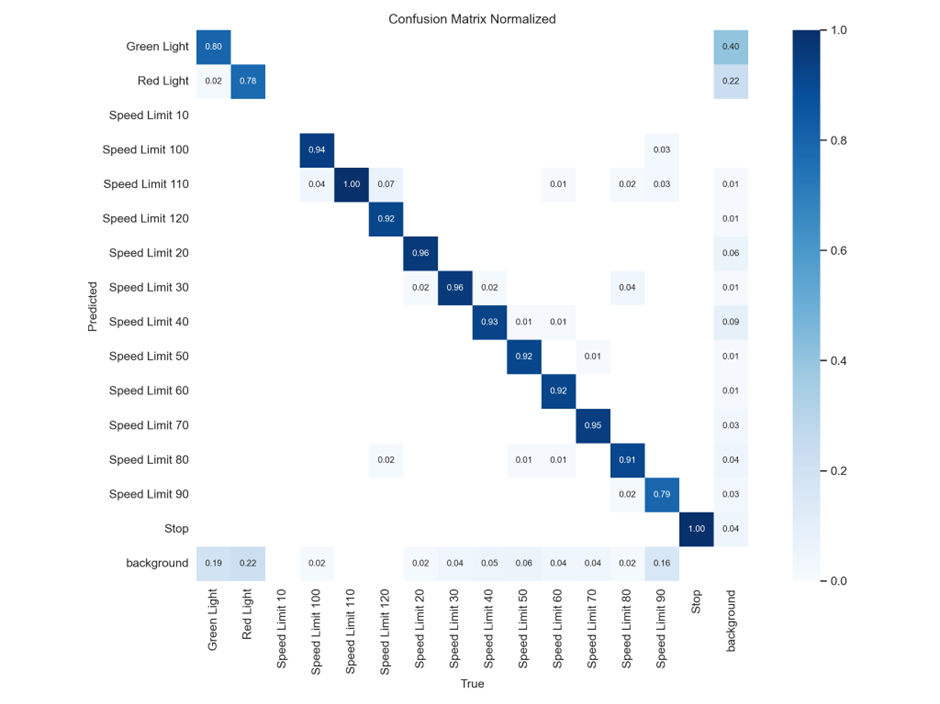
This matrix shows how often YOLOv8 correctly classifies traffic signs. Most classes are well-classified, with very high diagonal values (~0.9+). For example:
- Speed Limit 120 → 92% correct
- Stop → 100% correct
- Green Light → 80% correct
But there are some off-diagonal cells with non-zero values, indicating misclassifications:
- Red Light is misclassified as background: 22%
- Speed Limit 90 has 9% misclassified as background
Meaning: High accuracy across most classes, very “confident” and robust. Stop and Speed Limit 120 are almost perfectly predicted. Background confusion is low. Good candidate for a baseline (resistant model).
YOLOv10 Confusion Matrix
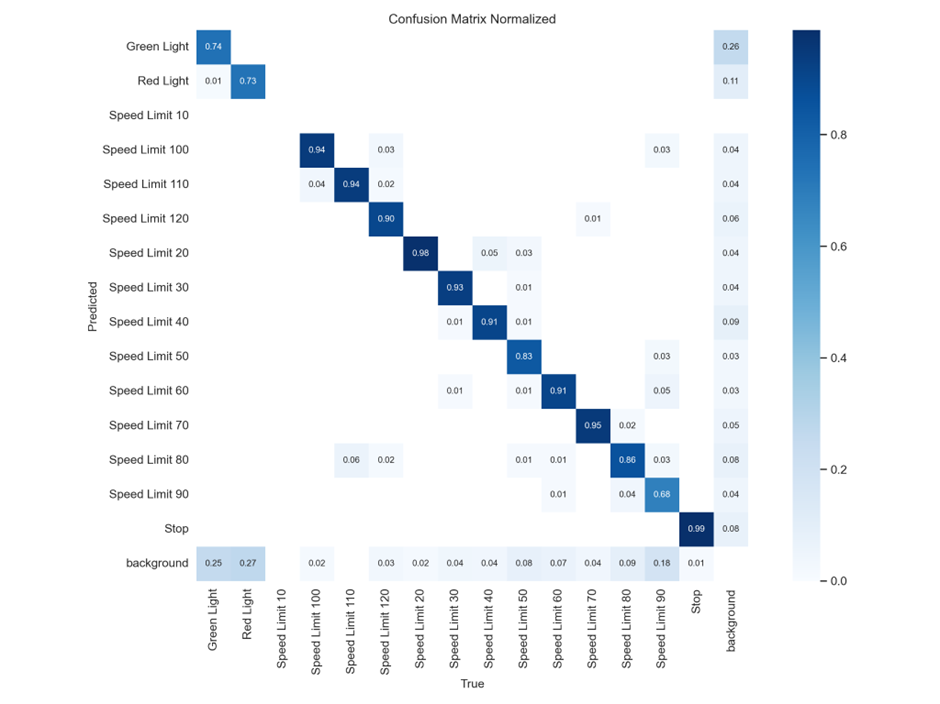
YOLOv10 is more error-prone:
- Lower accuracy for Speed Limit 50 (only 83%)
- Speed Limit 90 → 68% correct (vs 79% in v8)
- Background misclassifications are more frequent
Also, notice that:
- Green Light has more misclassified to background (25%) than YOLOv8 (19%)
- Stop has a tiny error (0.01) vs v8’s 0
Meaning: Generally less confident. Speed Limit 50, Speed Limit 90, and Green Light show significant confusion. More background misclassifications — weaker in separating signs from noise.
TLDR
| Class | YOLOv8 Accuracy | YOLOv10 Accuracy | Notes |
|---|---|---|---|
| Stop | 100% | 99% | Close, but v10 is worse |
| Speed Limit 90 | 79% | 68% | v10 significantly worse |
| Speed Limit 50 | 92% | 83% | v10 worse again |
| Green Light | 80% | 74% | More misclassifications |
So, if we want to find a target for adversarial attack, we’d look at:
- Speed Limit 90
- Speed Limit 50
- Green Light
- Or others with bigger confusion differences
We should take a sign that YOLOv8 predicts well, and find a transformation that throws YOLOv10 off. Alternatively, we look for signs where YOLOv10 is overly confident but wrong.
From the matrices, Speed Limit 90, Green Light, and Red Light stood out. We’ll focus our adversarial transformations there.
What is this about?!
What Is the Core Problem (Adversarial ML)
We were tasked with creating what’s called an adversarial image.
Adversarial image: An image that looks normal to a human, but fools a model into a wrong or conflicting prediction.
Here, you’re exploiting how model versions differ in behavior:
- YOLOv8 and YOLOv10 might interpret the same image differently
- Their internal training weights and thresholds differ
- Even a small change can cause model A to classify “Stop Sign” and model B to classify “Speed Limit 30”
Exploit
I chose a Speed Limit 90 sign (get any image and it will do).
We want to:
- Apply adversarial noise or image transformations to cause YOLOv10 to flip predictions or reduce confidence.
- Preserve YOLOv8’s confidence and class prediction (or reduce it less aggressively).
- Automate it to test multiple transforms efficiently.
Transformations Used
Inspired by adversarial attack papers and data augmentation strategies:
- Rotation: [-25°, 25°]
- Gaussian blur: simulate camera shake
- Color Jitter: manipulate hue, contrast, and brightness
- Random Noise: force internal neuron activations to fire inconsistently
Exploit walkthrough
Requirements
Before running the script, install these if not already:
| |
Next :
| |
We load both models using the Ultralytics YOLO class and define a clean input image.
| |
This is the Adversarial Transformation Function, it applies randomized transformations, making each output a unique adversarial attempt.
| |
For the Prediction Comparison Logic, this extracts for each model:
- Predicted class label
- Confidence score
| |
This loop generates a transformed image, evaluates it with both models, checks the divergence condition, and submits to the server once found.
Exploit Code
| |
Running it yields :
| |
Why This Worked
YOLO models are CNN-based and sensitive to small perturbations, especially in earlier convolution layers. YOLOv8 and YOLOv10 likely have slightly different weights, training data, or hyperparameters, meaning they respond differently to noise. The transformation pipeline ensured we created images in the decision boundary space — areas where small input changes cause big output changes.
This is a textbook black-box adversarial attack. We didn’t need gradients, only output labels and confidence.